
Instructions
Network: No.63Guests
Password (case sensitive): SamuelWard
OVEN USE INSTRUCTIONS FOR GUESTS
Important Safety Notes
– Use oven gloves – surfaces get hot!
– Never place foil or paper on the bottom.
– Keep children away when in use.
– Do NOT touch heating elements during or after use – they stay hot!
– Do NOT use the oven for heating rooms.
– Do not place flammable materials in or near the oven.
Before You Begin
– Check the oven is clean – wipe surfaces if needed.
– Remove any packaging or trays not in use.
– Do not place items on the bottom of the oven – use shelves only.
How to Use the Oven
1. Switch On the Oven
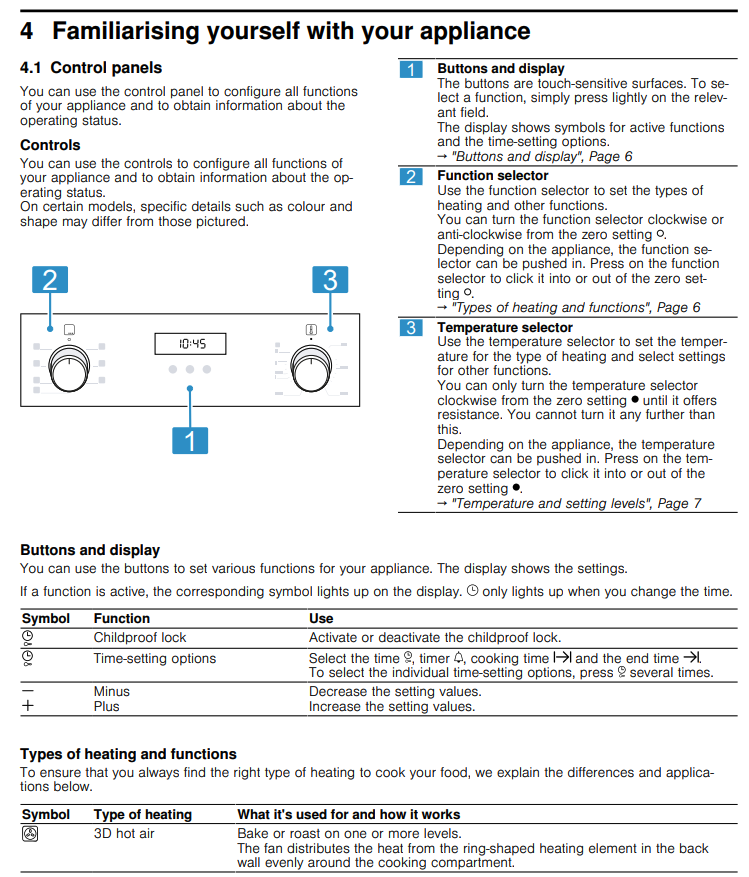
– Turn the function selector (left dial) to choose a cooking mode:
– 3D Hot Air – for baking/roasting on one or more shelves.
– Grill – for toasting, steaks, or sausages.
– Hot Air Grilling – great for roasting chicken or fish.
2. Set the Temperature
– Turn the temperature selector (right dial) to choose your cooking temperature (e.g. 180°C).
3. Preheat (if needed)
– A heat-up symbol will show in the display. Start cooking once it disappears.
4. Finish Cooking
– Turn both dials back to “0” / Off.
Using the Timer (Optional)
• Press the clock button several times to cycle through:
– Timer (independent reminder)
– Cooking time (oven switches off after this time)
– End time (delayed start)
• Use + / – to set time.
Child Lock (Optional)
• Activate/Deactivate: Hold the clock button until the lock symbol appears or disappears.
Cleaning Tips
– Always allow the oven to cool before cleaning.
– Wipe inside with hot soapy water.
– Avoid harsh chemicals or scouring pads.
– Do NOT pour water into a hot oven.
– Remove and wash trays as needed.
Troubleshooting
| Problem | Solution |
| Oven not working | Check it’s plugged in |
| Clock flashing | Set the time using + / – buttons. |
| Oven won’t start | Make sure the child lock isn’t on. |
Download FULL Manufacturer’s Instructions HERE
MICROWAVE INSTRUCTIONS FOR GUESTS (MODEL: AMW 492)
SAFETY FIRST
– Never operate with nothing inside – always place food or a drinkable liquid in the microwave.
– Do NOT use metal items or sealed containers (e.g. jars, eggs) – they can explode.
– Always supervise when using plastic or paper containers.
– Do NOT deep-fry or use flammable items inside.
– If there’s smoke or fire, keep the door closed and unplug it.
– Keep children away unless supervised.
-Always refer to a microwave cookbook for details, if cooling or reheating food that contains alcohol.
BASIC OPERATION
Reheating or Cooking:
1. Place food in a microwave-safe container.
2. Press the Power button to select strength (750W for most uses).
3. Use + / – buttons to set the time.
4. Press Start.
Jet Start (Quick 30 sec):
– Just press Start for 30 seconds at full power.
– Press again to add more time in 30-second steps.
Pause/Stop:
– Open the door to pause.
– Close it and press Start again to continue.
– Press Stop to cancel.
DEFROSTING
– Use Jet Defrost for frozen food (100g – 2kg).
1. Press Jet Defrost.
2. Set weight with + / -.
3. Press Start.
– Turn food when prompted.
– Use 160W (Low Power) for manual defrost.
GRILL & COMBINATION COOKING
– Grill is for browning food (e.g. cheese, toast).
– Grill Combi cooks with microwave + grill:
– Use for lasagna, chicken, baked potatoes, etc.
– Do NOT use plastic or paper with the grill.
SETTING THE CLOCK
1. Hold Stop (3 sec) until the hour blinks.
2. Use + / – to set hour, then press Start.
3. Set minutes, then press Start again.
CLEANING & MAINTENANCE
– Always unplug first.
– Wipe inside with soft cloth and mild detergent.
– Don’t use abrasive pads or metal cleaners.
– Dishwasher-safe parts:
– Glass turntable
– Turntable support
– Add lemon juice to water and microwave to freshen.
– Grill area will self-clean with use.
TROUBLESHOOTING
– If not working, check:
– Plug is in securely.
– Door is closed properly.
– Turntable is in place.
– Power supply is on.
Download FULL Manufacturer’s Instructions HERE
To Work The Television
1. Turn on TV with Samsung remote
2. Press source button and pick HDMI1
3. Turn Humax on with Humax remote and press STB, and then TV guide
4. Make sure STB button is pressed and NOT TV
Washing Machine – Simple User Guide for Holiday Flat Guests
This guide helps you use the washing machine easily and safely during your stay.
Safety Tips
Do not open the door mid-cycle.
Keep children away from the machine.
Before You Start
- Make sure the drum is empty.
- Open the door and load laundry evenly.
- Do not overload. Follow care labels on clothes.
- Add detergent to the correct drawer compartment.
How to Use the Machine
- Turn the programme dial to choose your wash cycle.
- If needed, adjust temperature and spin speed using the buttons.
- Press the start/pause button to begin the wash.
- Wait until the cycle finishes and the door unlocks before opening.
Common Programmes
Do not use the machine if it appears damaged.
Cotton: For towels, bedding, and daily items.
Synthetics: For mixed loads of synthetic fabrics.
Delicates: For fragile items needing a gentle wash.
Wool: For wool garments labelled machine washable.
Quick Wash: For small, lightly soiled loads.
Optional Settings
Prewash: For heavily soiled items.
Extra Rinse: Adds an extra rinse cycle.
Delay Start: Set a later time for the wash to begin.
After the Wash
Turn off the dial to the off position.
Remove laundry promptly and leave the door slightly open.
Clean the detergent drawer occasionally.
Troubleshooting
Machine won’t start: Check the door is closed and the power is on.
Water not draining: The pump filter may need cleaning.
Display shows error: Turn off the machine, wait a few seconds, and restart. Contact your host if the issue continues.
For full manufacturers’ instructions CLICK HERE
Dishwasher – Simple User Guide for Holiday Flat Guests
This guide provides basic instructions for using the dishwasher safely and effectively during your stay.
Before You Start
Safety Tips
Keep detergents away from children.
Only use dishwasher-safe items.
- Check that the filters are clean and spray arms can rotate freely.
- Make sure the salt and rinse aid are topped up if needed.
- Load dishes correctly without blocking the spray arms.
Loading the Dishwasher - Place large items like pots and plates in the bottom rack.
- Place cups, glasses, and small items in the top rack.
- Do not overload. Make sure all items are dishwasher-safe.
Adding Detergent - Open the detergent dispenser and add one tablet or powder as per instructions.
- If not using an all-in-one tablet, add rinse aid and salt in their separate compartments.
Starting a Wash
- Close the door firmly.
- Press the power button.
- Select a programme using the programme button.
- Press the start button. The cycle will begin shortly after.
Common Programmes
Do not open the door during operation unless absolutely necessary.
Eco: For normal loads with less energy and water use.
Intensive: For pots, pans, and heavily soiled dishes.
Quick: For lightly soiled items needing a fast wash.
Pre-rinse: Rinses dishes to be washed later.
After the Wash
Wait a few minutes before opening the door after the cycle ends.
Open the door slightly to allow steam to escape and improve drying.
Unload the bottom rack first to prevent drips from the upper rack.
Cleaning and Maintenance
Clean filters regularly to prevent clogs.
Wipe the door seal and edges to avoid dirt buildup.
Check and clean spray arms occasionally.
Troubleshooting
Dishwasher not starting: Check the door is closed and power is on.
Poor cleaning: Avoid overloading and check spray arms and filters.
Warning lights: Refill salt or rinse aid as needed.
For Manufacturers’ full instructions CLICK HERE
Property Managers’ Phone numbers:
07790 032692
07966 226283
If you need to call the emergency services dial: 999
